
 Control Techniques
 Estun Automation
 CODESYS
 Crevis
 Nexcom / Nexcobot
 Leroy-Somer
 Servo Systems
 AC Drive + Motor
 DC Drives
 Smart PLC
 Panel PC / IPC
 Remote I/O
Counting, Classification and Sorting on Conveyors
By the ONX Control engineering team · Last updated:
In short
A conveyor counting and sorting system uses a camera to find each passing product individually, classify it (type, colour, size, defective or sound), count it and divert it to the correct lane with an air jet, flap or pusher. The reject command is issued not by time but by the product's position tracked with the encoder, so the product is diverted at the right point even if the line speed changes. ONX Control builds this system with an edge AI computer, a GigE camera and the line PLC.
How it works
The camera views the full width of the conveyor; encoder-triggered frames provide a continuous image of the belt. The model finds and classifies each product: product type, colour, size class or defect. To avoid counting the same product twice in two consecutive frames, each product is tracked by its belt position and counted only once.
The class and belt position (cross-belt position and encoder value) of each product are written to a queue. When the product reaches the sorting point, the PLC fires the air valve or flap that corresponds to the product's cross-belt position at exactly that moment. If the belt speed changes, the moment of sorting is recalculated from the encoder; the drift that occurs with time-delay-based sorting does not arise.
Counts are kept per class and written to production records: how many products passed, how many were sorted into each class and how many were defective. This record is used both for yield tracking and for spotting problems on the infeed side early.
-
1
Imaging
An encoder-triggered camera views the full width of the belt continuously.
-
2
Detection and class
The model finds and classifies every product; each product is tracked by belt position and counted once.
-
3
Tracking queue
Class, cross-belt position and encoder value are written to the sorting queue.
-
4
Sorting
When the product reaches the sorting point, the relevant valve or flap fires, timed by the encoder.
Critical parameters
| Parameter | Why it matters | Value |
|---|---|---|
| Belt speed and width | Determine the camera trigger interval, the field of view and the response time of the sorting mechanism. | Defined per project |
| Product density and distribution | Whether products touch each other; determines how reliable counting and sorting are. | Defined per project |
| Number of classes and distinguishing feature | Colour, shape, size or a subtle defect; determines the choice of model and lighting. | Defined per project |
| Sorting mechanism | Air jet, flap, pusher or robot; selected according to product weight and number of lanes. | Defined per project |
| Hygiene and environment | Washdown, dust and humidity on food lines; determine the protection rating of the camera and lighting. | Defined per project |
Values are determined after reviewing your product and line; we do not make general sorting speed or accuracy promises on this page.
ONX architecture
The camera image reaches the edge AI computer over GigE; the detection and classification model runs on the GPU with TensorRT. The product list (class, cross-belt position, encoder value) is sent to the PLC via Modbus TCP or OPC UA; valves and flaps are driven from the PLC's fast outputs or from EtherCAT remote I/O.
In simple, single-lane reject applications, the digital outputs of the Nexcom COEUS-3721T can drive the reject valve directly. To prevent motion blur on fast-moving products, the global shutter MG-A121K-9 in stock and strobe lighting are selected; the rolling shutter Crevis MG-A121L-9 in stock can be used on slow lines with Global Reset mode and a strobe.
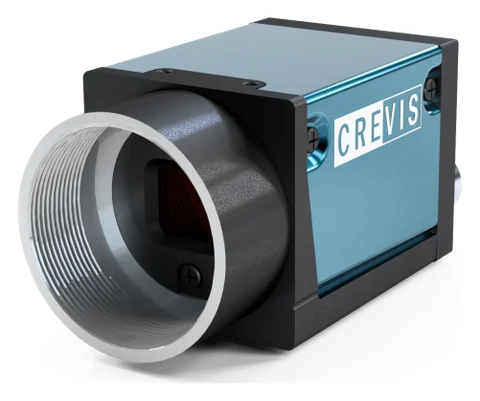
GigE industrial camera and optics
Crevis MG series GigE Vision cameras and 12 MP lenses. Resolution, sensor type (rolling or global shutter), lens and lighting are selected according to the smallest defect and the line speed. The MG-A121L-9 (Sony STARVIS IMX226, rolling shutter + Global Reset) and MG-A121K-9 (Sony Pregius IMX304, global shutter) in stock are powered over PoE on a single cable and triggered from an encoder or photocell through their external trigger input.
Edge AI computer
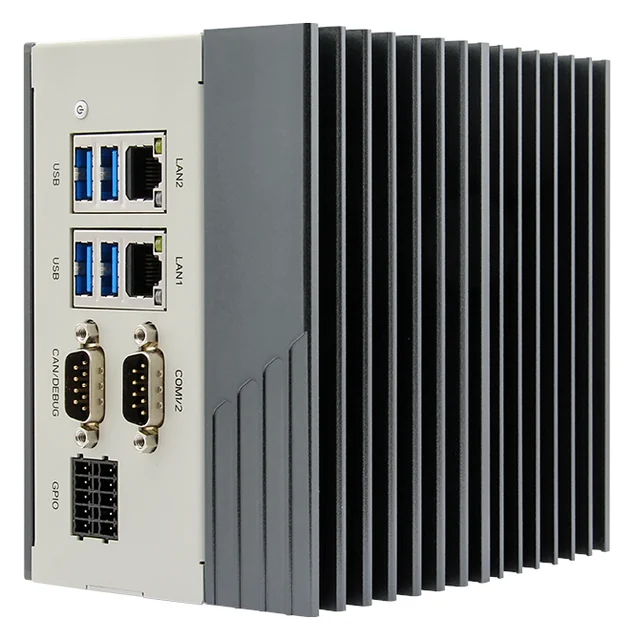
Nexcom COEUS-3721T: fanless box PC, NVIDIA Jetson Orin Nano 4 GB (512-core Ampere GPU; manufacturer rating 34 TOPS, INT8, Super mode), 2 × GbE, 4 × USB 3.0, HDMI, 4 DI / 4 DO, RS232/422/485, CAN, 9–30 V DC, DIN rail. Models run on the GPU with TensorRT or ONNX Runtime under Ubuntu 22.04 and JetPack 6.2; images never leave the plant.
PLC and motion control
The decision goes to your existing PLC via a digital output, Modbus TCP or OPC UA. In small cells, CODESYS Control for Linux ARM64 SL can run as the PLC on the same Jetson device.
Feasibility and pilot
What decides the success of an AI project is your product, your lighting and your line speed, not a catalogue figure. That is why every project starts with your own samples: first, images are collected on the bench with the right camera, lens and lighting, an initial model is trained, and the false reject and miss rates are measured on your parts. If the result meets the acceptance criterion, the system runs on the line as a pilot, initially in a mode that only logs and makes no decisions.
In sorting projects, the feasibility study collects images from every class of your products and from borderline samples; the boundaries between classes are labelled according to your own quality definition. During the pilot phase, the system counts and classifies but does not sort; sorting is commissioned after the results have been compared with manual sorting.
Adding it to an existing line
A camera bridge, lighting and a sorting mechanism are added to a belt where sorting is done by hand. An encoder is fitted to the belt motor or a measuring wheel is used; sorting outputs and count data are added to the existing PLC.
- Defining product classes and borderline samples with the quality team
- Adding an encoder or measuring wheel to the belt
- Selecting the sorting mechanism according to product weight and number of lanes
- Setting up and testing sorting timing with the encoder
- Transferring count data to production records
Together with ONX solutions
This application connects directly to the motion control of the machines and lines ONX builds. How the vision or data result feeds the PLC, servo axes and EtherCAT network in these solutions:
Packaging machines + OCR, code reading and rejection
Date, lot and DataMatrix prints are read at the packaging machine's outfeed, compared with the machine's active recipe, and faulty packs are rejected. On thermoformers and tray sealers, product presence and placement in each cavity can be checked before sealing. Reject timing is tied to the machine's master axis position, so the right pack is removed even when speed changes.
Smart belt and lug chain infeed + camera
A camera placed instead of, or next to, the photocell gives the product's position, orientation and defects at once. The position feeds the phasing belt's correction; flipped, broken or incomplete products are rejected before they reach the wrapper. Since the smart belt already has encoders and servo axes, the vision result connects straight into motion control.
X Motion + conveyor-tracking pick
The x, y, θ from the camera and the encoder value at the moment of capture become a conveyor-tracking pick through X Motion's synchronisation and electronic cam functions. The Cartesian or SCARA axis group runs in the same CODESYS application, and the axes are sized with ONX Motion Sizing.
Frequently asked questions
Why is sorting done by encoder rather than by time?
With time-based sorting, when the belt speed changes the product reaches the sorting point earlier or later than calculated, and the valve fires on the wrong product. A product tracked by the encoder is diverted when it reaches the correct position on the belt, whatever the speed.
Can it count touching products separately?
A segmentation model can find touching products individually. If products frequently overlap, bringing them into a single row or layer on the infeed side makes both counting and sorting more reliable.
Is AI needed for colour sorting?
For clear colour differences, classical colour classification may be sufficient, and in that case we recommend it. Deep learning is needed where a defect is defined by shape, texture or a subtle difference in shade.
How is hygiene ensured on food lines?
The camera and lighting are installed in enclosures with a protection rating suited to the line's washdown and hygiene conditions; the parts in contact with food are limited to the sorting mechanism, which is selected accordingly.
Can we transfer count data to our ERP?
Yes. Per-class counts are written to the PLC and to production records; transfer to the MES or ERP is defined in the project.
Let us talk about your sorting and counting needs
Product classes, belt speed and width, the number of sorting lanes and some sample products are all we need; we will come back to you with a feasibility plan.