
 Control Techniques
 Estun Automation
 CODESYS
 Crevis
 Nexcom / Nexcobot
 Leroy-Somer
 Servo Systems
 AC Drive + Motor
 DC Drives
 Smart PLC
 Panel PC / IPC
 Remote I/O
OCR, Date and Lot Verification and DataMatrix Code Reading
By the ONX Control engineering team · Last updated:
In short
An OCR (optical character recognition) and code reading system uses a camera to read prints such as best-before dates, lot and serial numbers on packaging or parts, as well as DataMatrix, QR and barcodes, and compares them with the expected value. A wrong date, a faded print or an unreadable code is rejected from the line, and the value read from every item is logged. ONX Control builds this system with an edge AI computer, a GigE camera and the line PLC; when the recipe changes, the expected value changes automatically as well.
How it works
The camera views the product from the side carrying the print, triggered by a photo sensor or the encoder. In the first step, the model locates the text and code regions in the image; in the second step, the text is read character by character, while codes are decoded with a standard decoder. In difficult cases such as curved surfaces, glossy film or inkjet dot-matrix printing, learning-based OCR is more robust than the classical method that relies on a fixed font template.
The value read is compared with the expected value from the recipe currently running on the line: the correct date format, the correct lot, a consecutive serial number. If the print is readable but wrong, if it is unreadable, or if the code grade is below the acceptance limit, the product is rejected from the line at the reject point. Consecutive failures trigger an alarm for the printer or labeller.
The value read, timestamp and decision are logged for every item. In the event of a recall, this record shows which batch was produced, when and on which line; for serialised parts, it brings the records of assembly and test stations together under the same ID.
-
1
Trigger and image
When the product reaches the camera, a photo sensor or the encoder triggers it; the printed side is illuminated.
-
2
Region detection
The model locates the text and code regions; skewed or shifted prints are corrected.
-
3
Reading and comparison
The text is read and the code decoded; the value is compared with the expected value in the recipe.
-
4
Rejection and logging
Wrong or unreadable items are rejected; the value of every item is logged with a timestamp.
Critical parameters
| Parameter | Why it matters | Value |
|---|---|---|
| Line speed and product pitch | Determine the camera exposure time, the need for strobe lighting and how fast the reject mechanism must act. | Defined per project |
| Print type and surface | Inkjet, laser, thermal transfer or label; glossy film, curved bottle or carton; determine the lighting and reading method. | Defined per project |
| Character height | Determines the field of view and resolution; small prints need a narrow field of view. | Defined per project |
| Code type and quality requirement | DataMatrix, QR or 1D barcode; is reading alone required, or grading of print quality as well? | Defined per project |
| Recipe and data source | Determines how the expected value is obtained from the PLC, the MES or the printer. | Defined per project |
Values are determined after reviewing your products and line; we do not make general read-rate promises on this page.
ONX architecture
The camera image reaches the edge AI computer over GigE; the text detection and reading models run on the GPU with TensorRT, and codes are decoded with standard libraries. The expected value is taken from the line PLC or the MES via Modbus TCP or OPC UA; the reject command is issued via a digital output or through the PLC.
To prevent motion blur on moving products, a short exposure and strobe lighting are needed. The Crevis MG-A121L-9 in stock is a rolling shutter camera; with Global Reset mode and a strobe it suits slow lines and stations where the product stops. On fast packaging lines, the global shutter MG-A121K-9 in stock (Sony Pregius IMX304) is selected.
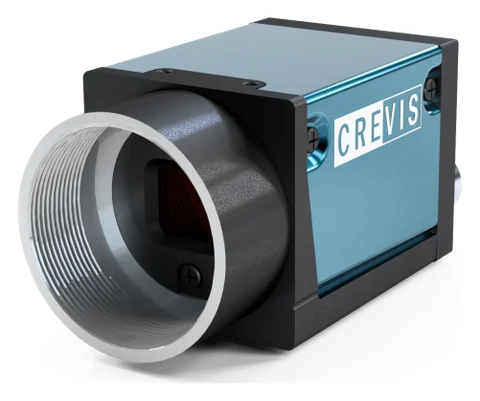
GigE industrial camera and optics
Crevis MG series GigE Vision cameras and 12 MP lenses. Resolution, sensor type (rolling or global shutter), lens and lighting are selected according to the smallest defect and the line speed. The MG-A121L-9 (Sony STARVIS IMX226, rolling shutter + Global Reset) and MG-A121K-9 (Sony Pregius IMX304, global shutter) in stock are powered over PoE on a single cable and triggered from an encoder or photocell through their external trigger input.
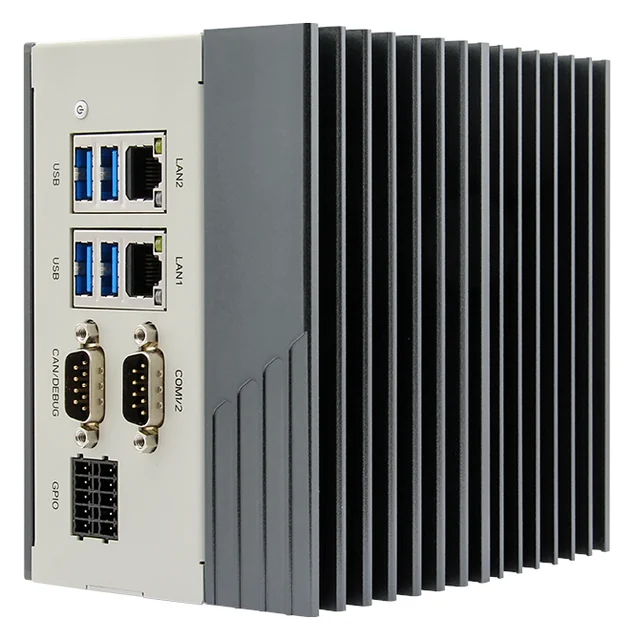
Edge AI computer
Nexcom COEUS-3721T: fanless box PC, NVIDIA Jetson Orin Nano 4 GB (512-core Ampere GPU; manufacturer rating 34 TOPS, INT8, Super mode), 2 × GbE, 4 × USB 3.0, HDMI, 4 DI / 4 DO, RS232/422/485, CAN, 9–30 V DC, DIN rail. Models run on the GPU with TensorRT or ONNX Runtime under Ubuntu 22.04 and JetPack 6.2; images never leave the plant.
PLC and motion control
The decision goes to your existing PLC via a digital output, Modbus TCP or OPC UA. In small cells, CODESYS Control for Linux ARM64 SL can run as the PLC on the same Jetson device.
Image processing and model software
Image acquisition and pre-processing with Python and OpenCV, YOLO-family detection and segmentation models, labelling, training and model version control; the operator screen and logging interface are written by ONX.
Feasibility and pilot
What decides the success of an AI project is your product, your lighting and your line speed, not a catalogue figure. That is why every project starts with your own samples: first, images are collected on the bench with the right camera, lens and lighting, an initial model is trained, and the false reject and miss rates are measured on your parts. If the result meets the acceptance criterion, the system runs on the line as a pilot, initially in a mode that only logs and makes no decisions.
In OCR projects, the feasibility study is carried out with your actual packaging and your actual printer: samples are collected from different batches, different ink levels and deliberately degraded prints. During the pilot phase, the system logs every value it reads but does not reject; rejection is enabled after the false reject and miss results have been evaluated together with you.
Adding it to an existing line
OCR and code reading are usually added to a running packaging line, immediately after the printer or labeller. A short conveyor section is enough for the camera, lighting and reject mechanism; trigger, reject and recipe signals are added to the existing PLC.
- Locating space after the printer for the camera and reject mechanism
- Obtaining the recipe and expected value from the PLC, the MES or the printer
- Setting up reject point timing with the encoder or a photo sensor
- Defining the consecutive failure alarm and line stop rule
- Writing the values read to the traceability database
Together with ONX solutions
This application connects directly to the motion control of the machines and lines ONX builds. How the vision or data result feeds the PLC, servo axes and EtherCAT network in these solutions:
Packaging machines + OCR, code reading and rejection
Date, lot and DataMatrix prints are read at the packaging machine's outfeed, compared with the machine's active recipe, and faulty packs are rejected. On thermoformers and tray sealers, product presence and placement in each cavity can be checked before sealing. Reject timing is tied to the machine's master axis position, so the right pack is removed even when speed changes.
Frequently asked questions
What is the difference between classical OCR and AI-based OCR?
Classical OCR expects a fixed font and clean printing; the template is set up separately for each product. Learning-based OCR learns different fonts, dot-matrix printing and the distortion caused by curved or glossy surfaces from examples, and is more robust under these conditions. If the print is clean and consistent, the classical method may also be sufficient.
Does it only read, or does it also measure print quality?
Both are possible. Reading and value comparison alone are sufficient for most food and packaging lines; if codes need to be graded against a standard, suitable lighting, calibration and methods are selected.
Who enters the expected date when the recipe changes?
The expected value is not entered manually; it is taken from the active recipe in the PLC or MES, or if necessary directly from the data sent by the printer. This also catches an operator entering the wrong date.
What happens to an unreadable item?
An unreadable item is rejected in the same way as a misprinted one, and its image is logged. Consecutive read failures trigger an alarm, as they point to a problem such as a clogged print head.
How long are the records kept?
The retention period is set according to the shelf life of your product and regulatory requirements. Records are kept inside the plant; transfer to the MES or ERP is defined in the project.
Let us talk about your print and code inspection
Packaging type, printing method, line speed and a few sample packs are all we need; we will run a reading test with your samples.