
 Control Techniques
 Estun Automation
 CODESYS
 Crevis
 Nexcom / Nexcobot
 Leroy-Somer
 Servo Systems
 AC Drive + Motor
 DC Drives
 Smart PLC
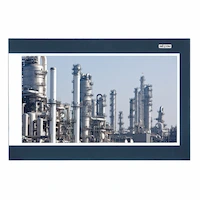 Panel PC / IPC
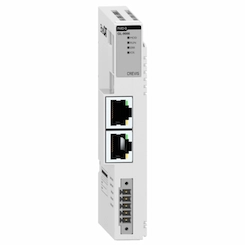 Remote I/O
Camera-Based Hazard Zone Monitoring (Supplementary System)
By the ONX Control engineering team · Last updated:
In short
Camera-based zone monitoring is a supplementary system that detects people entering defined zones around a machine, robot cell or forklift route from camera images, gives visual and audible warnings, and can send a request to slow down or pause the machine when needed. There is an important limitation: this system is not a safety function and does not replace safety light curtains, laser scanners, safety interlocks or a safety PLC; it is used alongside them to reduce and record violations. ONX Control builds this system with an edge AI computer and plant cameras, without images leaving the plant.
How it works
The camera usually views the monitored area from above or from a high angle. Two zones are defined on the image: an outer warning zone and an inner hazard zone. The model finds people in every frame; each person's foot point is compared with the zone polygons.
When a person enters the warning zone, visual and audible warnings are given; when they enter the hazard zone, a slow-down or pause request can be sent to the PLC. This request goes through the machine's normal (non-safety) control path. Safe stopping of the machine is always ensured by certified safety equipment and the safety circuit; even if the camera system is out of service, the safety function continues to work.
Each violation is logged with the time, the zone and a short image clip; people's faces can be masked. These records allow the health and safety team to see at which point, on which shift and for which task the zone was entered, and to eliminate the root cause (poor layout, a missing handle, retrieving material during operation).
-
1
Zone definition
Warning and hazard zones are drawn on the image; they can change according to the machine's operating state.
-
2
Person detection
The model finds people in every frame; the foot point is compared with the zones.
-
3
Warning and request
Light and sound in the warning zone; a slow-down or pause request to the PLC in the hazard zone.
-
4
Logging
The violation is logged with time, zone and a masked image clip; the safety circuit works independently of this.
Critical parameters
| Parameter | Why it matters | Value |
|---|---|---|
| Area to monitor and camera height | Determine the number of cameras, the lens angle and the likelihood of people occluding each other. | Defined per project |
| Number and shape of zones | Determines whether zones that change with the machine's operating state are needed. | Defined per project |
| Lighting and environment | Night shifts, dust, steam and reflections; determine the choice of camera and model. | Defined per project |
| Existing safety concept | Determines which safety equipment the system sits alongside and which risk it is intended to reduce. | Defined per project |
| Personal data and retention | Whether images are stored, whether faces are masked and for how long they are kept; determined under data protection law (KVKK). | Defined per project |
This system is not a safety function and carries no performance level (PL) or safety integrity level (SIL). The machine's safety functions are implemented with certified safety equipment according to the risk assessment.
ONX architecture
Images from plant cameras or an industrial camera reach the edge AI computer; person detection runs on the GPU. The warning beacon and sounder can be driven directly from the digital outputs of the Nexcom COEUS-3721T; the slow-down or pause request goes to the PLC via Modbus TCP, OPC UA or a digital signal.
Safety light curtains, laser scanners, interlocked guard doors and the safety PLC form the machine's safety circuit and are completely independent of the camera system. Images are processed inside the plant and are not sent to the cloud.
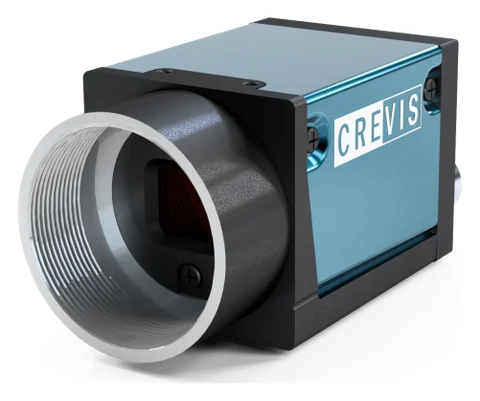
GigE industrial camera and optics
Crevis MG series GigE Vision cameras and 12 MP lenses. Resolution, sensor type (rolling or global shutter), lens and lighting are selected according to the smallest defect and the line speed. The MG-A121L-9 (Sony STARVIS IMX226, rolling shutter + Global Reset) and MG-A121K-9 (Sony Pregius IMX304, global shutter) in stock are powered over PoE on a single cable and triggered from an encoder or photocell through their external trigger input.
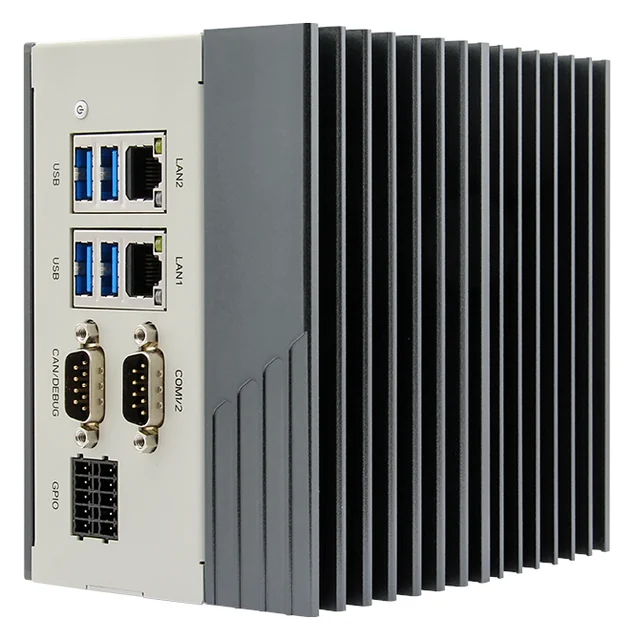
Edge AI computer
Nexcom COEUS-3721T: fanless box PC, NVIDIA Jetson Orin Nano 4 GB (512-core Ampere GPU; manufacturer rating 34 TOPS, INT8, Super mode), 2 × GbE, 4 × USB 3.0, HDMI, 4 DI / 4 DO, RS232/422/485, CAN, 9–30 V DC, DIN rail. Models run on the GPU with TensorRT or ONNX Runtime under Ubuntu 22.04 and JetPack 6.2; images never leave the plant.
PLC and motion control
The decision goes to your existing PLC via a digital output, Modbus TCP or OPC UA. In small cells, CODESYS Control for Linux ARM64 SL can run as the PLC on the same Jetson device.
Safety equipment (separate circuit)
Safety light curtains, laser scanners, interlocked guard doors and a safety PLC; selected according to the risk assessment and operating independently of the camera system.
Feasibility and pilot
In zone monitoring, the feasibility study is carried out with the camera angle on site: images of the area to be monitored are collected across different shifts and lighting conditions, and situations where people occlude each other or the machine are examined. During the pilot phase, the system only logs; violation records are evaluated together with your health and safety team.
Warning and slow-down functions are commissioned after the machine's existing safety concept and risk assessment have been reviewed. Informing employees about the processing of personal data and setting retention periods are agreed with your plant under data protection law (KVKK).
Adding it to an existing line
Zone monitoring is often added to a cell that already has safety equipment, to reduce and record violations. The camera is mounted at a high point, the warning beacon and sounder are placed at the zone boundary, and only a non-safety slow-down request is added to the PLC.
- Reviewing the existing safety concept and risk assessment
- Determining camera position and zone polygons on site
- Connecting the warning beacon, sounder and slow-down request
- Informing employees and defining image masking and retention period
- Log-only pilot and evaluation of violation reports
Together with ONX solutions
This application connects directly to the motion control of the machines and lines ONX builds. How the vision or data result feeds the PLC, servo axes and EtherCAT network in these solutions:
Robot cells and panels + zone monitoring
In cells built by ONX, the safety circuit is built separately in the panel with certified safety equipment. Camera zone monitoring can be added next to it as a warning and logging layer; it does not replace a safety function.
Frequently asked questions
Does this system replace a safety light curtain?
No. Person detection with a camera and AI is not a safety function; it carries no performance level (PL) or SIL. Safe stopping of the machine is ensured by safety light curtains, laser scanners, safety interlocks and a safety PLC selected according to the risk assessment. The camera system is used alongside them to reduce violations and keep records.
Then why use it?
Safety equipment stops the machine when a person reaches the danger point; the camera system sees the person earlier, over a wider area, and warns them. This can reduce unnecessary safety stops, and violation records help the health and safety team find the root cause.
Are images of people stored?
Images are processed on a computer inside the plant and are not sent to the cloud. If records are kept, face masking, the retention period and informing employees are agreed with your plant under data protection law (KVKK).
Can our existing security cameras be used?
Existing IP cameras can be used if their field of view, resolution and video stream are suitable. If the camera angle is not suited to seeing a person's foot point, an additional camera is recommended.
Can it distinguish forklifts from pedestrians?
Yes, the model can detect people and vehicles such as forklifts as separate classes, and a different zone rule can be defined for each. This, too, is not a safety function but a supplementary warning system.
Let us discuss your zone monitoring needs alongside your safety concept
Share your cell layout, existing safety equipment and the areas you want to monitor; we will propose a supplementary monitoring architecture.